UI / UX Design

Billing System Redesign

Improving accuracy, clarity, and operator confidence in high-risk billing workflows

Year :

2025

Industry :

SaaS

Project Duration :

3 Months

Designing trust and predictability into enterprise billing workflows


Why This Project Mattered


  • Billing errors don’t just slow teams down—they create downstream risk. In this system, operators were responsible for closing high-volume billing cycles where missed errors could directly impact revenue, customer trust, and internal credibility.

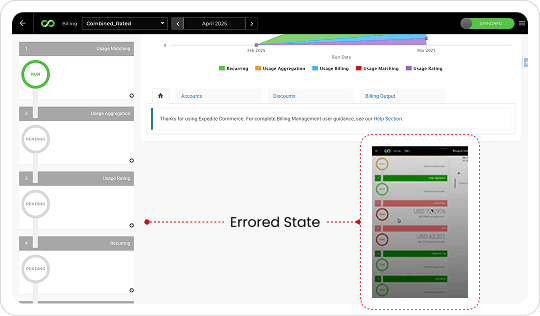
  • The existing Billing Console made this work harder than it needed to be. Errors were easy to miss. Filters hid critical data. Rerun workflows relied on memory instead of system feedback. Step progression behaved inconsistently, forcing analysts to second-guess whether the system could be trusted.

  • This project mattered because the cost of confusion wasn’t inconvenience—it was financial accuracy, operational confidence, and trust in the product itself.


My Role

  • I led the UX investigation and redesign of the Billing Console end-to-end.

  • My responsibility included diagnosing root UX failures, synthesizing research signals across users and implementation teams, reframing the problem space, and translating insights into a focused, high-fidelity redesign aligned with existing workflows and backend constraints.


Discovery Mindset

Before thinking about screens, I needed to understand why experienced operators were still making mistakes in a familiar system. What stood out wasn’t lack of training—it was a lack of reliable system feedback. The UI often contradicted backend reality, forcing users to compensate with manual checks, memory, and guesswork.
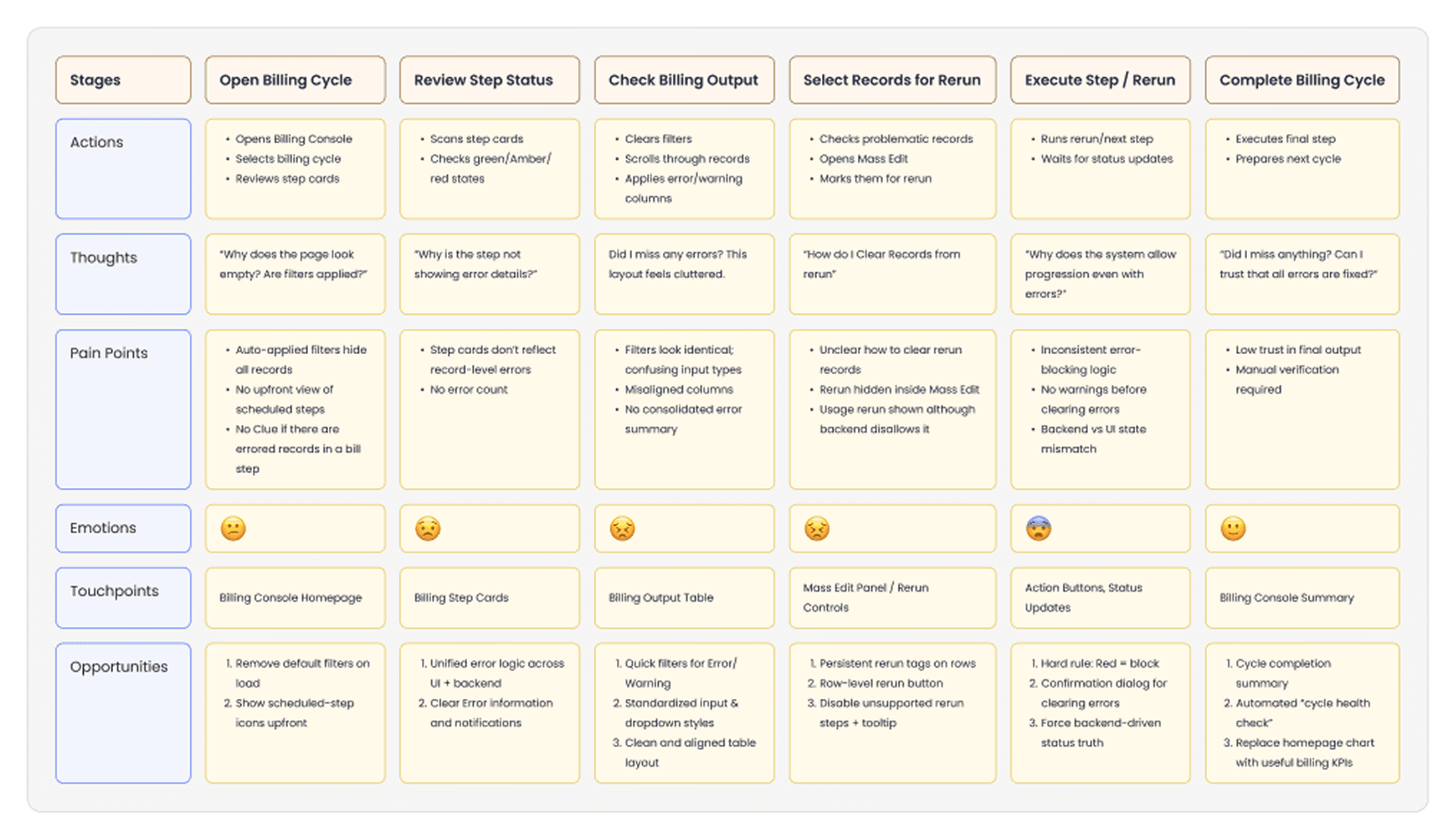


Questions that guided discovery
  • Where does the system fail to surface critical errors at the right moment?

  • Which workflows rely on user memory instead of visible state?

  • How often does the UI contradict backend behavior?

  • Where does the product increase cognitive load during high-risk actions?

  • What signals do users rely on when they don’t trust the interface?


Audit / Research Signals

Rather than overloading the study with methods, I focused on patterns that repeated across sources.
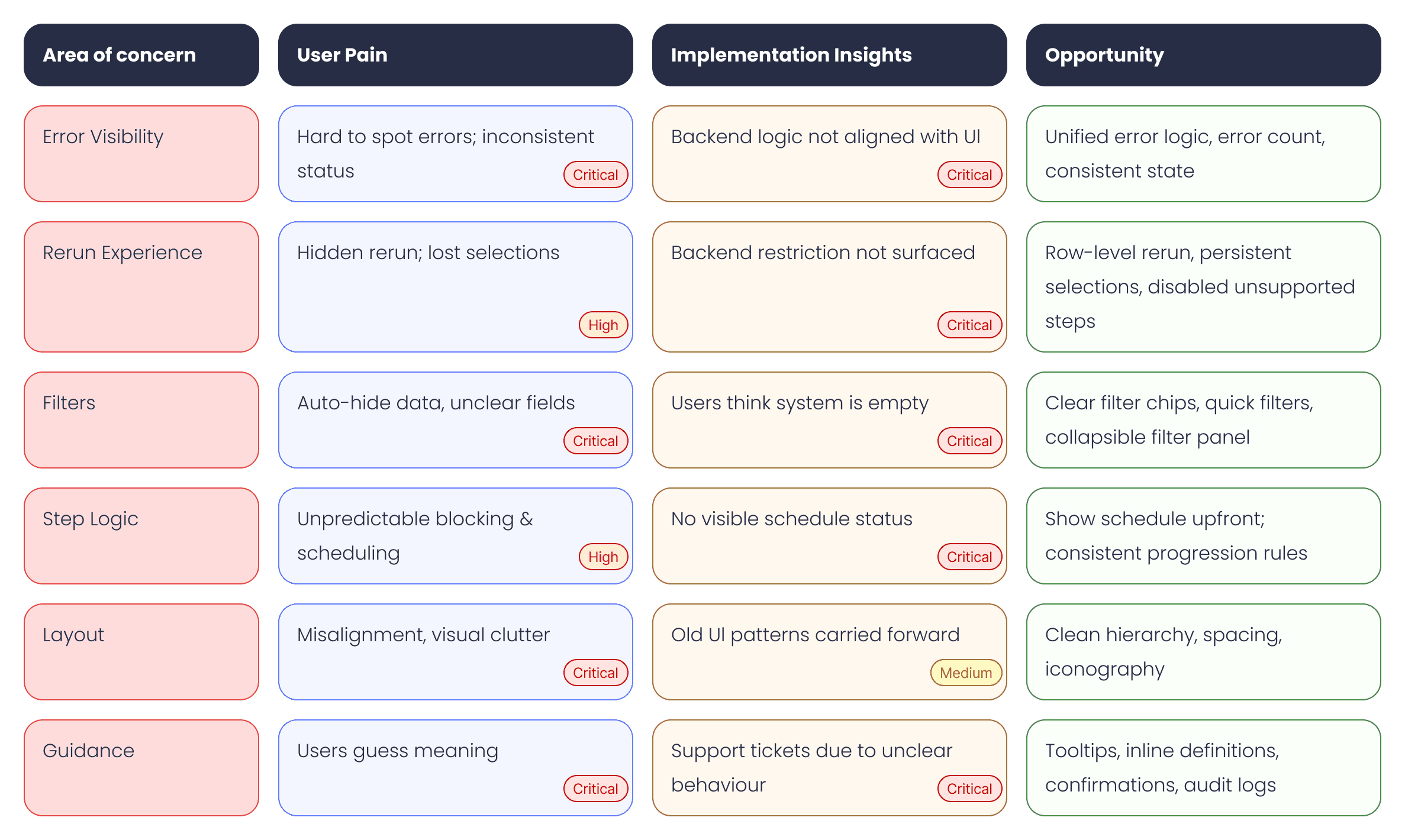


  • Error states were inconsistent and sometimes invisible unless users dug into logs

  • Rerun selections disappeared when filters changed, breaking trust mid-task

  • Default filters hid data on page load, leading users to assume no records existed

  • Scheduled steps were revealed only after execution began

  • High-risk actions lacked warnings, confirmations, or audit trails

  • Visual hierarchy made scanning difficult during time-sensitive work


Insight Shift


Problem

Intent

Cell Errors were easy to miss and inconsistently represented

Make error states unmissable, consistent, and aligned with backend truth

Reruns depended on memory and hidden controls

Make reruns explicit, persistent, and safe at both row and bulk levels

Filters obscured data and created false empty states

Ensure filters clarify system state instead of hiding it

Step logic and scheduling felt unpredictable

Surface step dependencies and schedules upfront, before execution

High-risk actions lacked guardrails

Introduce confirmations, explanations, and auditability for confidence


Design Exploration

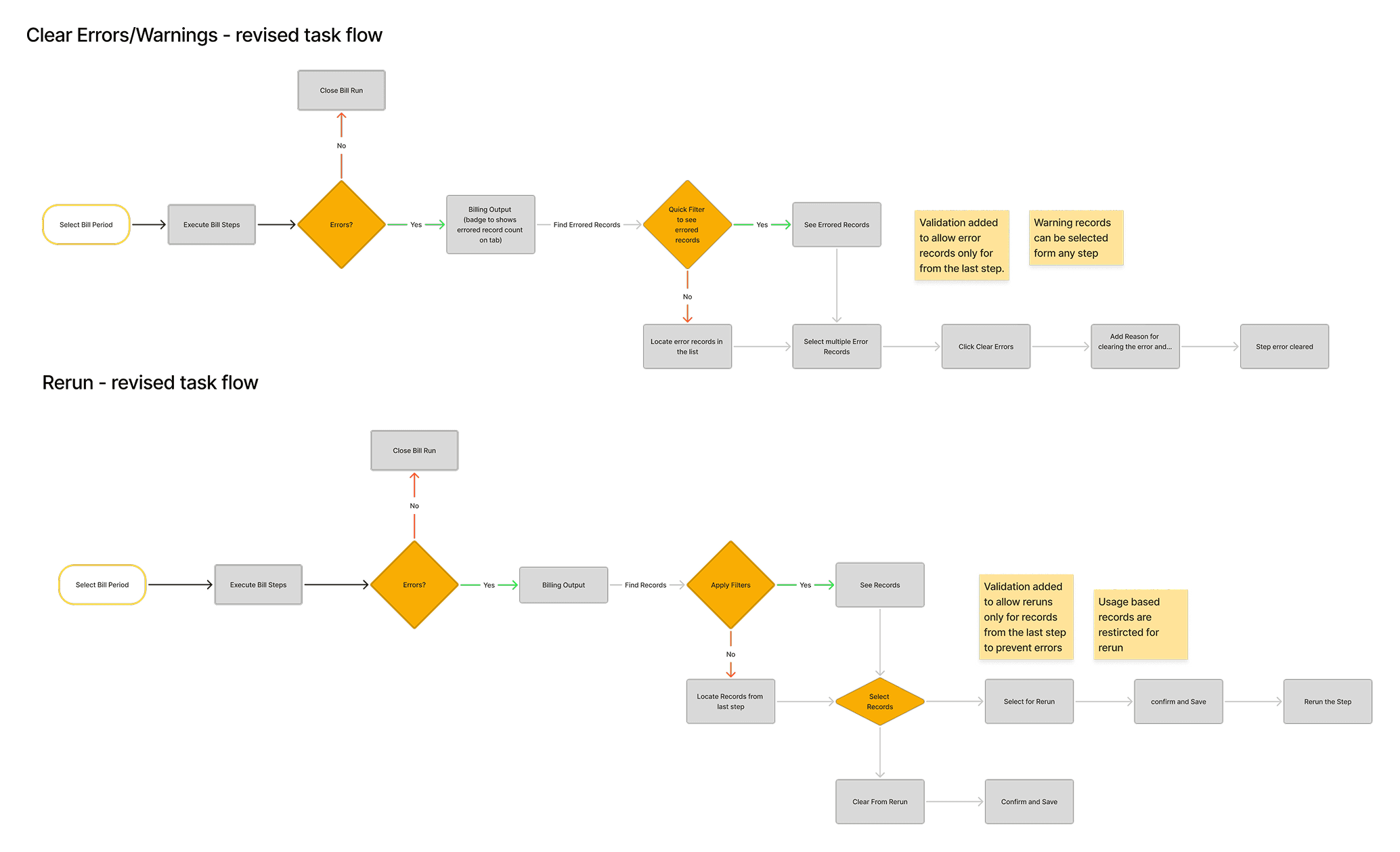
Because the core workflow was already well-established, the goal wasn’t reinvention—it was precision correction.

Exploration focused on how error information travels across tabs and steps, how selections persist across filtering and navigation, and how visual hierarchy can guide attention during high-pressure billing scenarios.


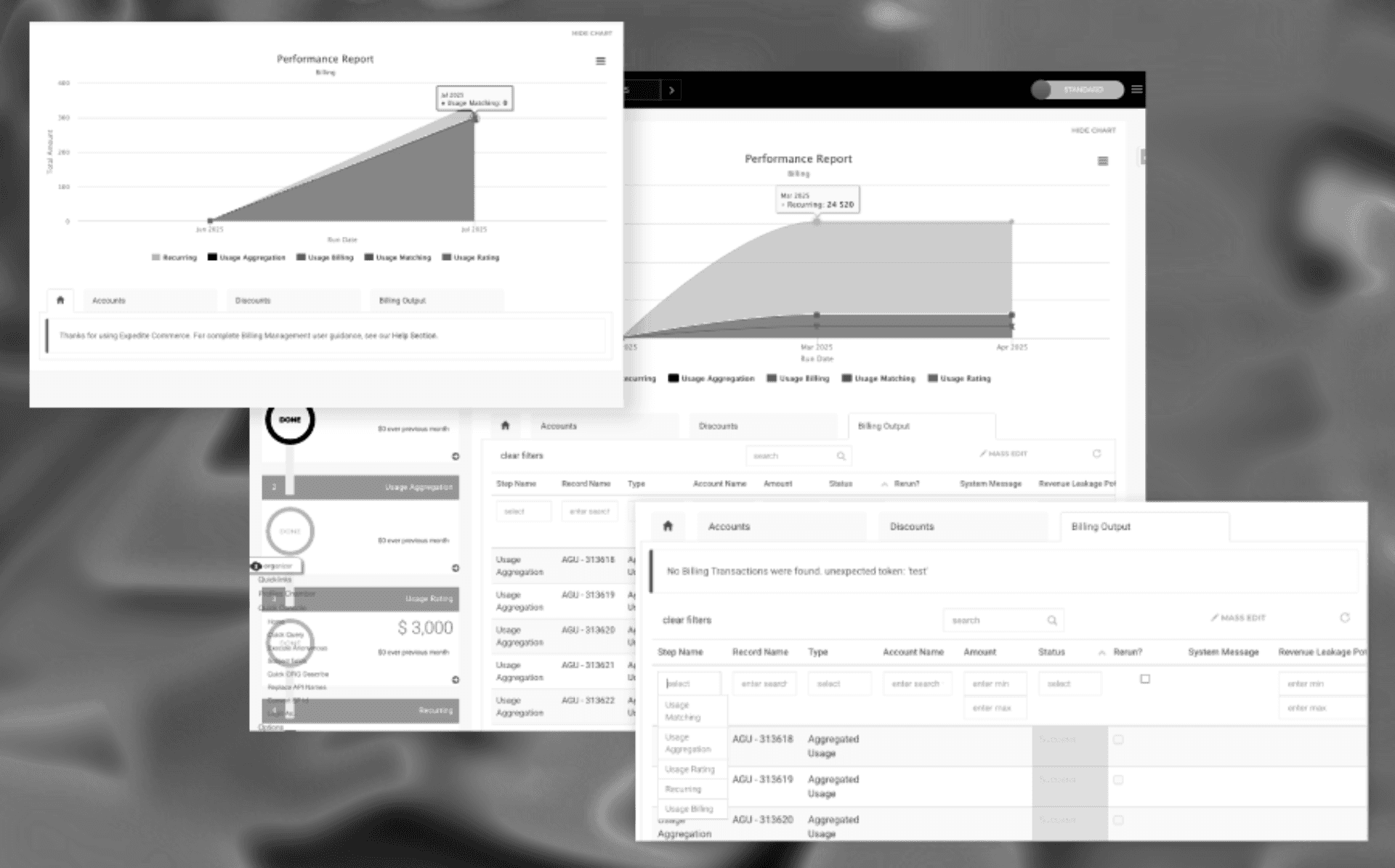
First Design Iteration

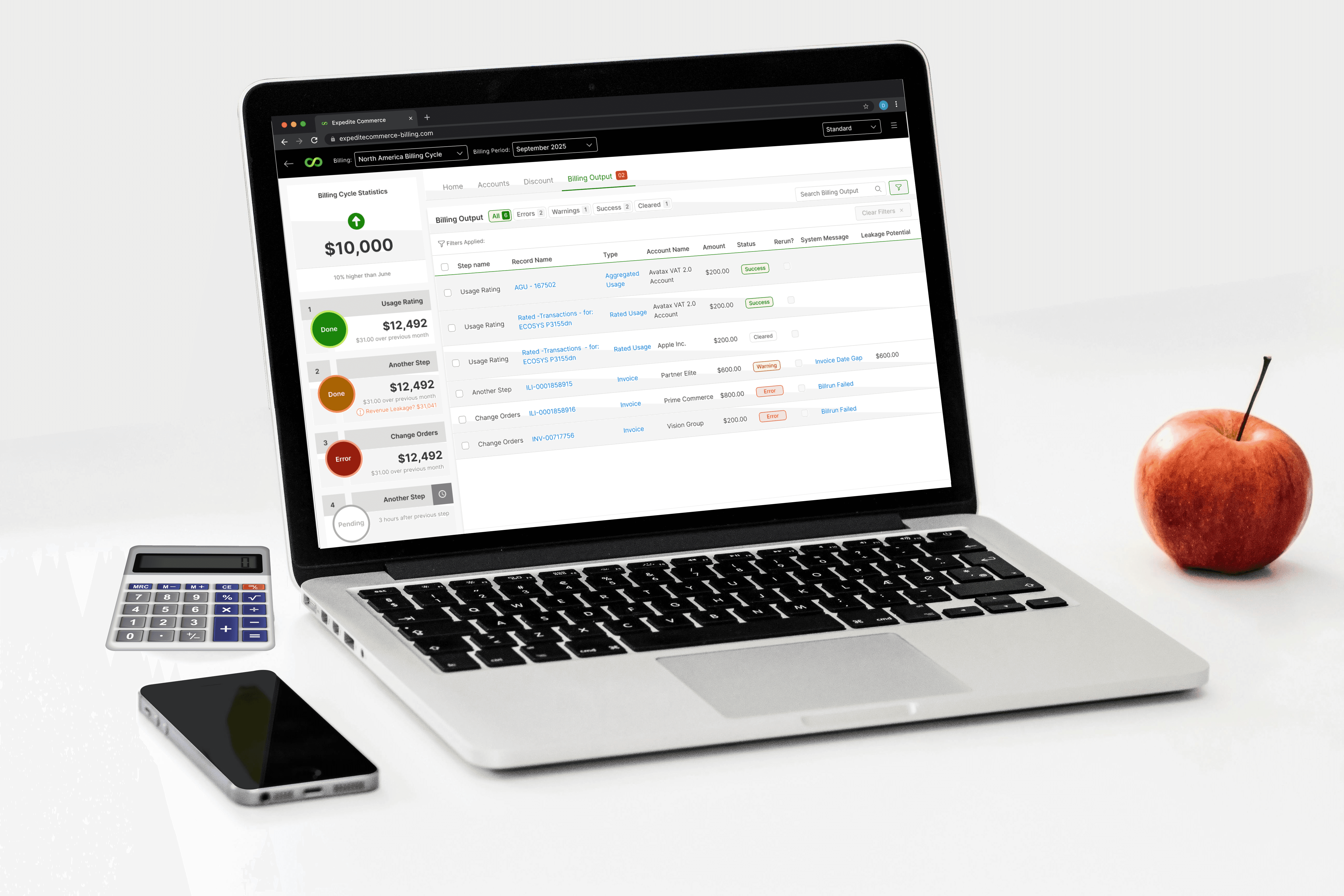
The first tangible output moved directly into high-fidelity design, intentionally.

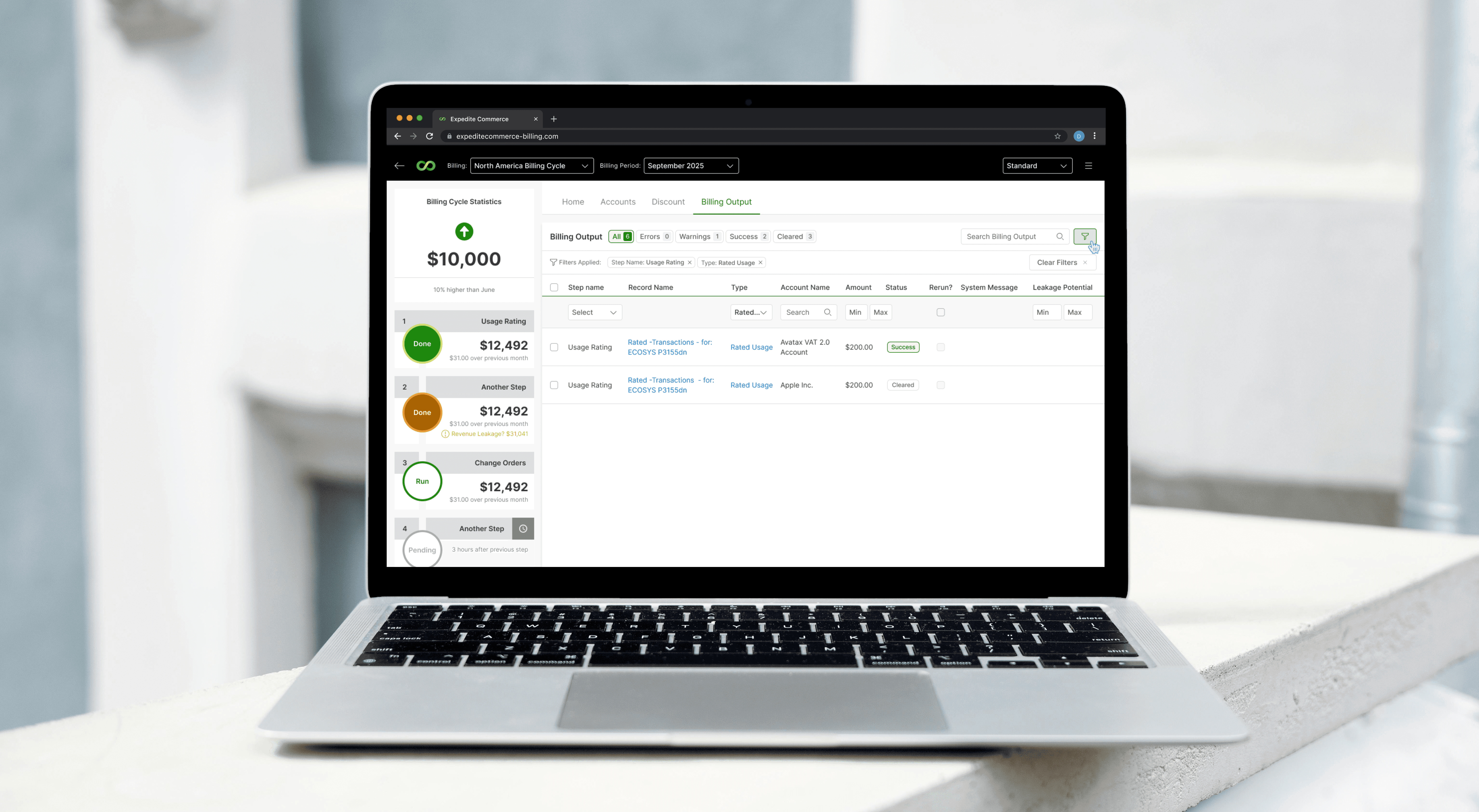
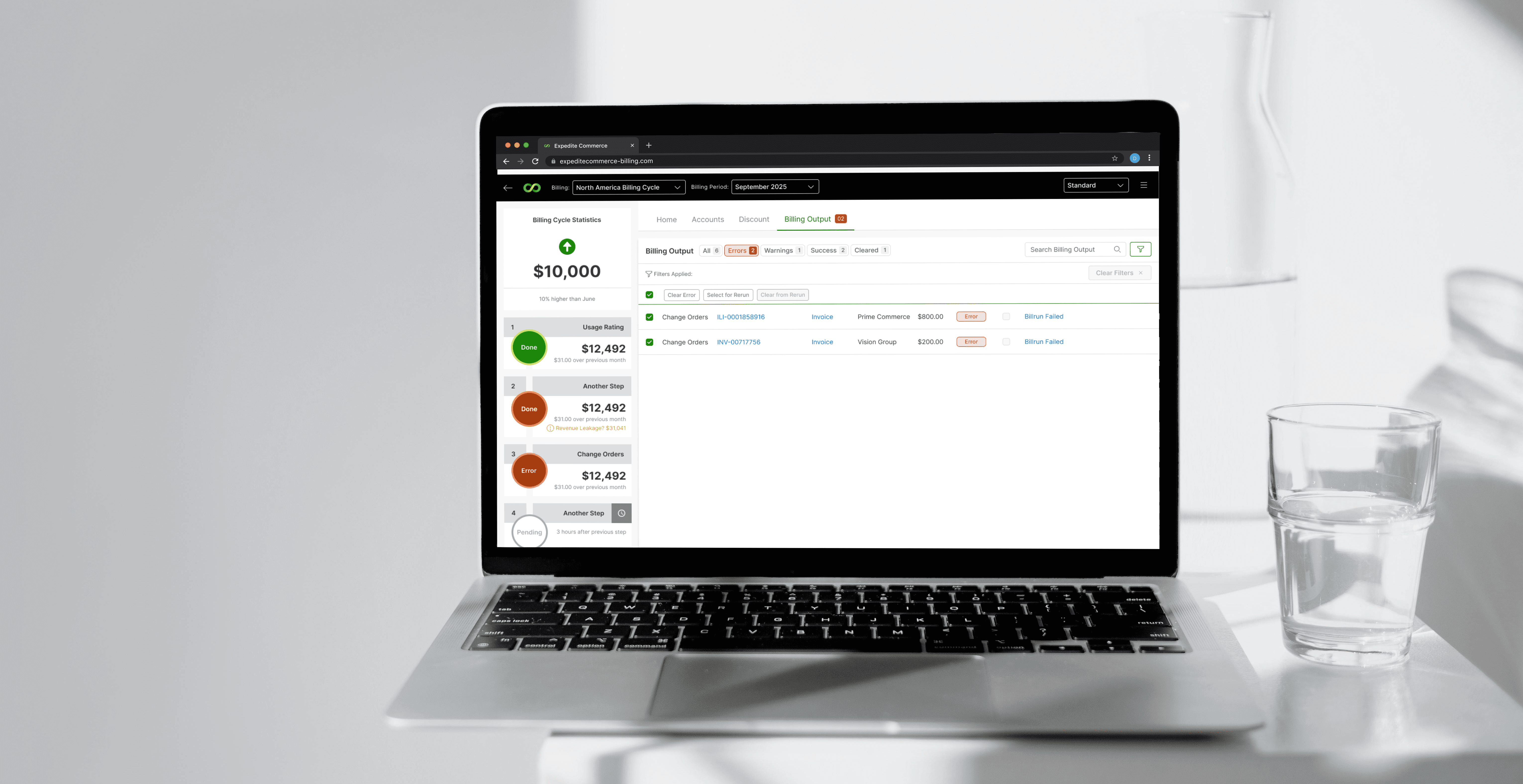
Low-fidelity wireframes would not have surfaced visual hierarchy issues, error salience problems, or scanability challenges in data-dense tables. This iteration focused on making system state explicit, reducing noise, and restoring trust through clarity.


Final Status

This redesign has been fully completed and validated at the design level.

The final outcome is a clarified, predictable Billing Console experience that aligns UI behavior with backend logic, removes guesswork from high-risk workflows, and restores operator confidence during billing cycles.

The system now supports analysts in completing billing cycles accurately, efficiently, and with confidence—without relying on manual workarounds or memory.

Before vs After improvement comparison

Landing Page


Before

After

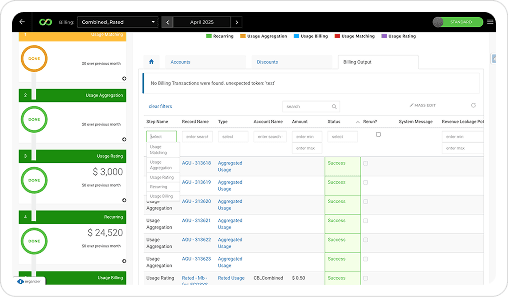
  • Poor Visibility of the landing page

  • Empty Home Page (does not provide any information)

  • When there are any errored steps, no visual clue to know how many errors occured

  • No way to identify Scheduled steps, Billing Analyst has to rely on memory

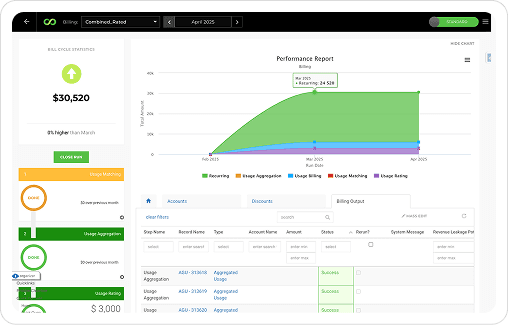
  • Charts at the top not sefving any purpose (Only displaying how many records are there per Step Type)

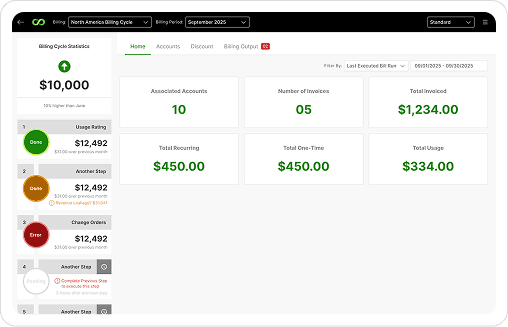
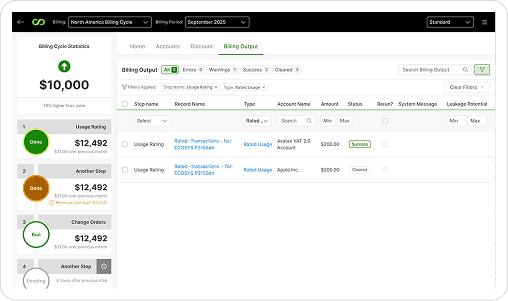
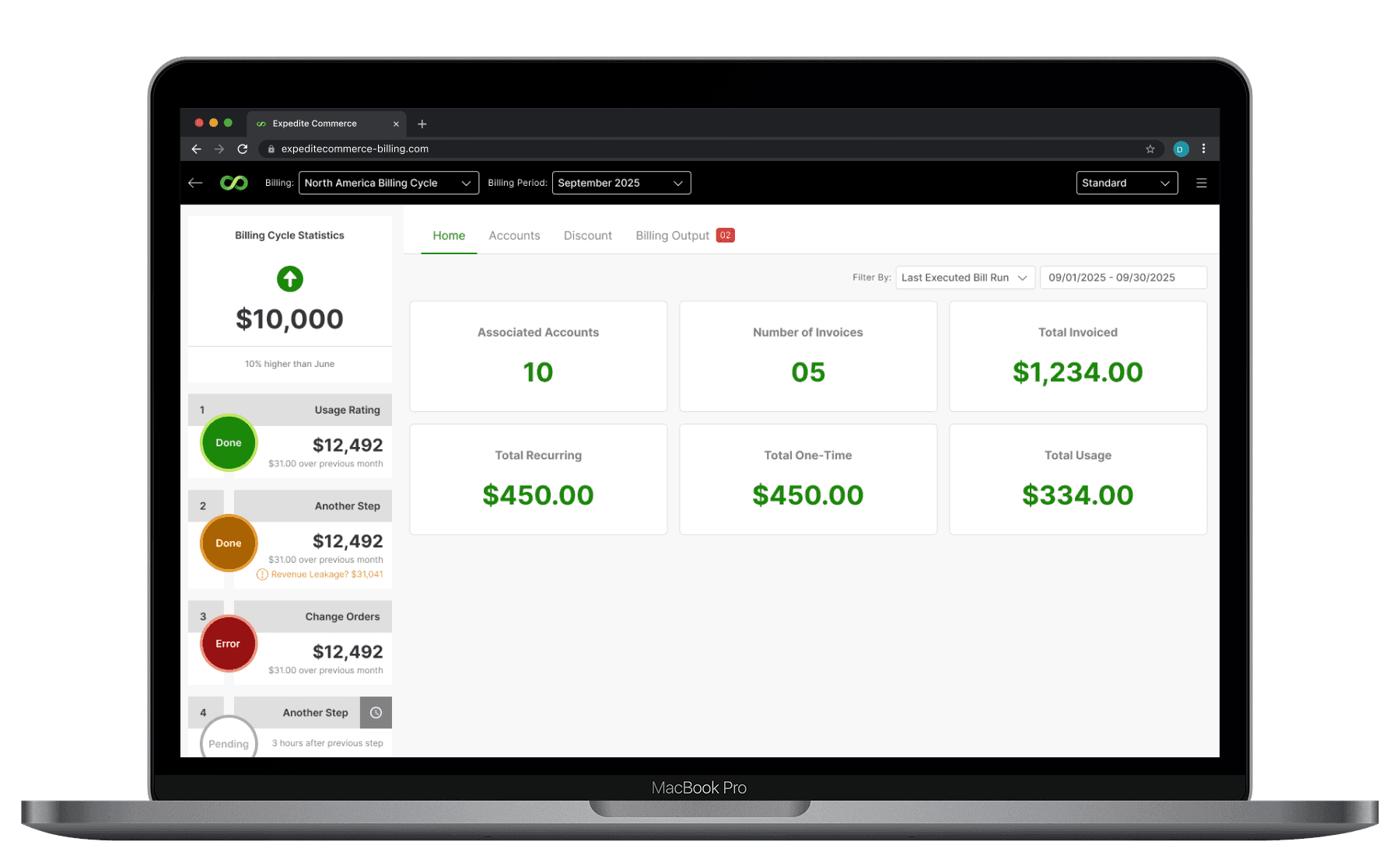
  • KPI Cards to show Bill Run related Key Information on landing Page with ability to view past data.

  • Clear Page structure with less clutter, makes it much more readable.

  • Clear defination of errors: Error Count badge on Billing output tab to show how many errors exist.

  • Introduced clock icon for scheduled steps, which makes it easy for Analyst to identify them and ability to update the schedule.

  • Disabled next step when previous step has errors.


Billing Output Tab


Before

After

  • Cognitive load, making it dificult to scan and identify actions

  • Clear Filter completly misses attention, making it dificult to locate

  • High visual noise: too many controls without prioritization.

  • Horizontal Scroll : Unless scrolled, user not aware of the scroll

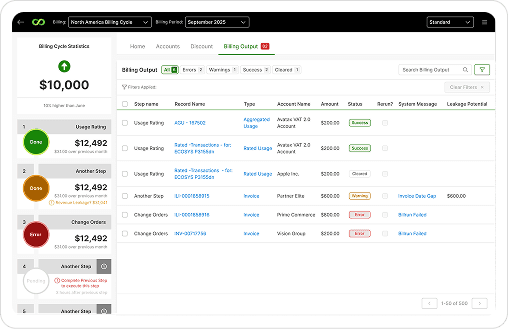
  • Clean alignment across all columns and table sections removing need of horizontal scroll.

  • Reduced visual noise through prioritization and spacing refinement.


Filters


Before

After

  • Filters always visible, increasing table height.

  • Field types (text, lookup, dropdown) looked identical → users clicks each one to understand it.

  • Applied filter indicators were not always visible → increased mistrust.

  • Filters auto-applied on page load, causing the table to appear empty on load.

  • Cluttered Filter Layout, increasing congitive load

  • Every column has own filter, irrespective of the requirement

  • Search hanging in the middle

  • Quick Filters for: Errors | Warnings | Pending Rerun

  • Filters : Clickable icon to show/hide filter row

  • Clean alignment of filters for quick scan of all filters

  • Filter fields redesigned with clear input types (text, dropdown, lookup).

  • Always-visible filter chips show what’s applied → eliminates uncertainty.

  • Default view shows all data on page load

  • Filters available for only filterable columns

  • Prominent Search.


Mass Actions


Before

After

  • Filters always visible, increasing table height.

  • Field types (text, lookup, dropdown) looked identical → users clicks each one to understand it.

  • Applied filter indicators were not always visible → increased mistrust.

  • Filters auto-applied on page load, causing the table to appear empty on load.

  • Cluttered Filter Layout, increasing congitive load

  • Every column has own filter, irrespective of the requirement

  • Search hanging in the middle

  • Quick Filters for: Errors | Warnings | Pending Rerun

  • Filters : Clickable icon to show/hide filter row

  • Clean alignment of filters for quick scan of all filters

  • Filter fields redesigned with clear input types (text, dropdown, lookup).

  • Always-visible filter chips show what’s applied → eliminates uncertainty.

  • Default view shows all data on page load

  • Filters available for only filterable columns

  • Prominent Search.


Reflection

This project reinforced an important lesson: when users don’t trust system feedback, they stop using the system and start compensating for it.

Good UX in operational tools isn’t about speed or aesthetics—it’s about making the right action obvious and the wrong action hard.




UI / UX Design

Billing System Redesign

Improving accuracy, clarity, and operator confidence in high-risk billing workflows

Year :

2025

Industry :

SaaS

Project Duration :

3 Months

Designing trust and predictability into enterprise billing workflows


Why This Project Mattered


  • Billing errors don’t just slow teams down—they create downstream risk. In this system, operators were responsible for closing high-volume billing cycles where missed errors could directly impact revenue, customer trust, and internal credibility.

  • The existing Billing Console made this work harder than it needed to be. Errors were easy to miss. Filters hid critical data. Rerun workflows relied on memory instead of system feedback. Step progression behaved inconsistently, forcing analysts to second-guess whether the system could be trusted.

  • This project mattered because the cost of confusion wasn’t inconvenience—it was financial accuracy, operational confidence, and trust in the product itself.


My Role

  • I led the UX investigation and redesign of the Billing Console end-to-end.

  • My responsibility included diagnosing root UX failures, synthesizing research signals across users and implementation teams, reframing the problem space, and translating insights into a focused, high-fidelity redesign aligned with existing workflows and backend constraints.


Discovery Mindset

Before thinking about screens, I needed to understand why experienced operators were still making mistakes in a familiar system. What stood out wasn’t lack of training—it was a lack of reliable system feedback. The UI often contradicted backend reality, forcing users to compensate with manual checks, memory, and guesswork.


Questions that guided discovery
  • Where does the system fail to surface critical errors at the right moment?

  • Which workflows rely on user memory instead of visible state?

  • How often does the UI contradict backend behavior?

  • Where does the product increase cognitive load during high-risk actions?

  • What signals do users rely on when they don’t trust the interface?


Audit / Research Signals

Rather than overloading the study with methods, I focused on patterns that repeated across sources.


  • Error states were inconsistent and sometimes invisible unless users dug into logs

  • Rerun selections disappeared when filters changed, breaking trust mid-task

  • Default filters hid data on page load, leading users to assume no records existed

  • Scheduled steps were revealed only after execution began

  • High-risk actions lacked warnings, confirmations, or audit trails

  • Visual hierarchy made scanning difficult during time-sensitive work


Insight Shift


Problem

Intent

Cell Errors were easy to miss and inconsistently represented

Make error states unmissable, consistent, and aligned with backend truth

Reruns depended on memory and hidden controls

Make reruns explicit, persistent, and safe at both row and bulk levels

Filters obscured data and created false empty states

Ensure filters clarify system state instead of hiding it

Step logic and scheduling felt unpredictable

Surface step dependencies and schedules upfront, before execution

High-risk actions lacked guardrails

Introduce confirmations, explanations, and auditability for confidence


Design Exploration

Because the core workflow was already well-established, the goal wasn’t reinvention—it was precision correction.

Exploration focused on how error information travels across tabs and steps, how selections persist across filtering and navigation, and how visual hierarchy can guide attention during high-pressure billing scenarios.


First Design Iteration

The first tangible output moved directly into high-fidelity design, intentionally.

Low-fidelity wireframes would not have surfaced visual hierarchy issues, error salience problems, or scanability challenges in data-dense tables. This iteration focused on making system state explicit, reducing noise, and restoring trust through clarity.


Final Status

This redesign has been fully completed and validated at the design level.

The final outcome is a clarified, predictable Billing Console experience that aligns UI behavior with backend logic, removes guesswork from high-risk workflows, and restores operator confidence during billing cycles.

The system now supports analysts in completing billing cycles accurately, efficiently, and with confidence—without relying on manual workarounds or memory.

Before vs After improvement comparison

Landing Page


Before

After

  • Poor Visibility of the landing page

  • Empty Home Page (does not provide any information)

  • When there are any errored steps, no visual clue to know how many errors occured

  • No way to identify Scheduled steps, Billing Analyst has to rely on memory

  • Charts at the top not sefving any purpose (Only displaying how many records are there per Step Type)

  • KPI Cards to show Bill Run related Key Information on landing Page with ability to view past data.

  • Clear Page structure with less clutter, makes it much more readable.

  • Clear defination of errors: Error Count badge on Billing output tab to show how many errors exist.

  • Introduced clock icon for scheduled steps, which makes it easy for Analyst to identify them and ability to update the schedule.

  • Disabled next step when previous step has errors.


Billing Output Tab


Before

After

  • Cognitive load, making it dificult to scan and identify actions

  • Clear Filter completly misses attention, making it dificult to locate

  • High visual noise: too many controls without prioritization.

  • Horizontal Scroll : Unless scrolled, user not aware of the scroll

  • Clean alignment across all columns and table sections removing need of horizontal scroll.

  • Reduced visual noise through prioritization and spacing refinement.


Filters


Before

After

  • Filters always visible, increasing table height.

  • Field types (text, lookup, dropdown) looked identical → users clicks each one to understand it.

  • Applied filter indicators were not always visible → increased mistrust.

  • Filters auto-applied on page load, causing the table to appear empty on load.

  • Cluttered Filter Layout, increasing congitive load

  • Every column has own filter, irrespective of the requirement

  • Search hanging in the middle

  • Quick Filters for: Errors | Warnings | Pending Rerun

  • Filters : Clickable icon to show/hide filter row

  • Clean alignment of filters for quick scan of all filters

  • Filter fields redesigned with clear input types (text, dropdown, lookup).

  • Always-visible filter chips show what’s applied → eliminates uncertainty.

  • Default view shows all data on page load

  • Filters available for only filterable columns

  • Prominent Search.


Mass Actions


Before

After

  • Filters always visible, increasing table height.

  • Field types (text, lookup, dropdown) looked identical → users clicks each one to understand it.

  • Applied filter indicators were not always visible → increased mistrust.

  • Filters auto-applied on page load, causing the table to appear empty on load.

  • Cluttered Filter Layout, increasing congitive load

  • Every column has own filter, irrespective of the requirement

  • Search hanging in the middle

  • Quick Filters for: Errors | Warnings | Pending Rerun

  • Filters : Clickable icon to show/hide filter row

  • Clean alignment of filters for quick scan of all filters

  • Filter fields redesigned with clear input types (text, dropdown, lookup).

  • Always-visible filter chips show what’s applied → eliminates uncertainty.

  • Default view shows all data on page load

  • Filters available for only filterable columns

  • Prominent Search.


Reflection

This project reinforced an important lesson: when users don’t trust system feedback, they stop using the system and start compensating for it.

Good UX in operational tools isn’t about speed or aesthetics—it’s about making the right action obvious and the wrong action hard.


UI / UX Design

Billing System Redesign

Improving accuracy, clarity, and operator confidence in high-risk billing workflows

Year :

2025

Industry :

SaaS

Project Duration :

3 Months

Designing trust and predictability into enterprise billing workflows


Why This Project Mattered


  • Billing errors don’t just slow teams down—they create downstream risk. In this system, operators were responsible for closing high-volume billing cycles where missed errors could directly impact revenue, customer trust, and internal credibility.

  • The existing Billing Console made this work harder than it needed to be. Errors were easy to miss. Filters hid critical data. Rerun workflows relied on memory instead of system feedback. Step progression behaved inconsistently, forcing analysts to second-guess whether the system could be trusted.

  • This project mattered because the cost of confusion wasn’t inconvenience—it was financial accuracy, operational confidence, and trust in the product itself.


My Role

  • I led the UX investigation and redesign of the Billing Console end-to-end.

  • My responsibility included diagnosing root UX failures, synthesizing research signals across users and implementation teams, reframing the problem space, and translating insights into a focused, high-fidelity redesign aligned with existing workflows and backend constraints.


Discovery Mindset

Before thinking about screens, I needed to understand why experienced operators were still making mistakes in a familiar system. What stood out wasn’t lack of training—it was a lack of reliable system feedback. The UI often contradicted backend reality, forcing users to compensate with manual checks, memory, and guesswork.


Questions that guided discovery
  • Where does the system fail to surface critical errors at the right moment?

  • Which workflows rely on user memory instead of visible state?

  • How often does the UI contradict backend behavior?

  • Where does the product increase cognitive load during high-risk actions?

  • What signals do users rely on when they don’t trust the interface?


Audit / Research Signals

Rather than overloading the study with methods, I focused on patterns that repeated across sources.


  • Error states were inconsistent and sometimes invisible unless users dug into logs

  • Rerun selections disappeared when filters changed, breaking trust mid-task

  • Default filters hid data on page load, leading users to assume no records existed

  • Scheduled steps were revealed only after execution began

  • High-risk actions lacked warnings, confirmations, or audit trails

  • Visual hierarchy made scanning difficult during time-sensitive work


Insight Shift


Problem

Intent

Cell Errors were easy to miss and inconsistently represented

Make error states unmissable, consistent, and aligned with backend truth

Reruns depended on memory and hidden controls

Make reruns explicit, persistent, and safe at both row and bulk levels

Filters obscured data and created false empty states

Ensure filters clarify system state instead of hiding it

Step logic and scheduling felt unpredictable

Surface step dependencies and schedules upfront, before execution

High-risk actions lacked guardrails

Introduce confirmations, explanations, and auditability for confidence


Design Exploration

Because the core workflow was already well-established, the goal wasn’t reinvention—it was precision correction.

Exploration focused on how error information travels across tabs and steps, how selections persist across filtering and navigation, and how visual hierarchy can guide attention during high-pressure billing scenarios.


First Design Iteration

The first tangible output moved directly into high-fidelity design, intentionally.

Low-fidelity wireframes would not have surfaced visual hierarchy issues, error salience problems, or scanability challenges in data-dense tables. This iteration focused on making system state explicit, reducing noise, and restoring trust through clarity.


Final Status

This redesign has been fully completed and validated at the design level.

The final outcome is a clarified, predictable Billing Console experience that aligns UI behavior with backend logic, removes guesswork from high-risk workflows, and restores operator confidence during billing cycles.

The system now supports analysts in completing billing cycles accurately, efficiently, and with confidence—without relying on manual workarounds or memory.

Before vs After improvement comparison

Landing Page


Before

After

  • Poor Visibility of the landing page

  • Empty Home Page (does not provide any information)

  • When there are any errored steps, no visual clue to know how many errors occured

  • No way to identify Scheduled steps, Billing Analyst has to rely on memory

  • Charts at the top not sefving any purpose (Only displaying how many records are there per Step Type)

  • KPI Cards to show Bill Run related Key Information on landing Page with ability to view past data.

  • Clear Page structure with less clutter, makes it much more readable.

  • Clear defination of errors: Error Count badge on Billing output tab to show how many errors exist.

  • Introduced clock icon for scheduled steps, which makes it easy for Analyst to identify them and ability to update the schedule.

  • Disabled next step when previous step has errors.


Billing Output Tab


Before

After

  • Cognitive load, making it dificult to scan and identify actions

  • Clear Filter completly misses attention, making it dificult to locate

  • High visual noise: too many controls without prioritization.

  • Horizontal Scroll : Unless scrolled, user not aware of the scroll

  • Clean alignment across all columns and table sections removing need of horizontal scroll.

  • Reduced visual noise through prioritization and spacing refinement.


Filters


Before

After

  • Filters always visible, increasing table height.

  • Field types (text, lookup, dropdown) looked identical → users clicks each one to understand it.

  • Applied filter indicators were not always visible → increased mistrust.

  • Filters auto-applied on page load, causing the table to appear empty on load.

  • Cluttered Filter Layout, increasing congitive load

  • Every column has own filter, irrespective of the requirement

  • Search hanging in the middle

  • Quick Filters for: Errors | Warnings | Pending Rerun

  • Filters : Clickable icon to show/hide filter row

  • Clean alignment of filters for quick scan of all filters

  • Filter fields redesigned with clear input types (text, dropdown, lookup).

  • Always-visible filter chips show what’s applied → eliminates uncertainty.

  • Default view shows all data on page load

  • Filters available for only filterable columns

  • Prominent Search.


Mass Actions


Before

After

  • Filters always visible, increasing table height.

  • Field types (text, lookup, dropdown) looked identical → users clicks each one to understand it.

  • Applied filter indicators were not always visible → increased mistrust.

  • Filters auto-applied on page load, causing the table to appear empty on load.

  • Cluttered Filter Layout, increasing congitive load

  • Every column has own filter, irrespective of the requirement

  • Search hanging in the middle

  • Quick Filters for: Errors | Warnings | Pending Rerun

  • Filters : Clickable icon to show/hide filter row

  • Clean alignment of filters for quick scan of all filters

  • Filter fields redesigned with clear input types (text, dropdown, lookup).

  • Always-visible filter chips show what’s applied → eliminates uncertainty.

  • Default view shows all data on page load

  • Filters available for only filterable columns

  • Prominent Search.


Reflection

This project reinforced an important lesson: when users don’t trust system feedback, they stop using the system and start compensating for it.

Good UX in operational tools isn’t about speed or aesthetics—it’s about making the right action obvious and the wrong action hard.